




- 绿色版查看
- 绿色版查看
- 绿色版查看
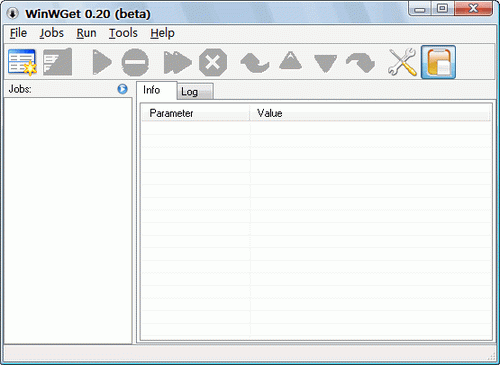
WinWGet is a GUI (Graphical User Interface) for Wget. It is FREE. It will keep track of your downloads - add, clone, edit, delete jobs. It will not make coffee for you! It is expected from you to know what options you need, yet it comes with reasonable defaults.
At this time the interface is available only for Windows OS. Soon it will be available for Unix/Linux.
Features (GUI and wget)
Threaded jobs
Monitor Clipboard for URL's (or new URLs only)
Resume for downloads
Mozilla integration through 'Download with' extension (command line URL) - how to
Mozilla integration through 'Launchy' (sample launchy.xml file)
Jobs export into HTML file
Predefined user-agents (IE, Mozilla, Opera, Flashget, MediaPlayer :-) and etc...)
Support for asp/php redirection and http authentication
Multiple ftp files/dirs download (? and * chars)
Bit rate limit (download speed)
check wget docs for more...



















有用
有用
有用